Monday, 12 December 2016

'Flow' Magazine Contents Page 2 Step 4

Once the photo was in place, the next step was to add a catchy headline as well as add some information relating to the article.

Saturday, 10 December 2016

'Flow' Magazine Contents Page 2 Step 3

This is the first photo included on this page, depicting a set of models in band form. The background of this image is black; this allows the image to stand out as it is a direct contrast from the white page.

Thursday, 8 December 2016

'Flow' Magazine Contents Page 2 Step 2

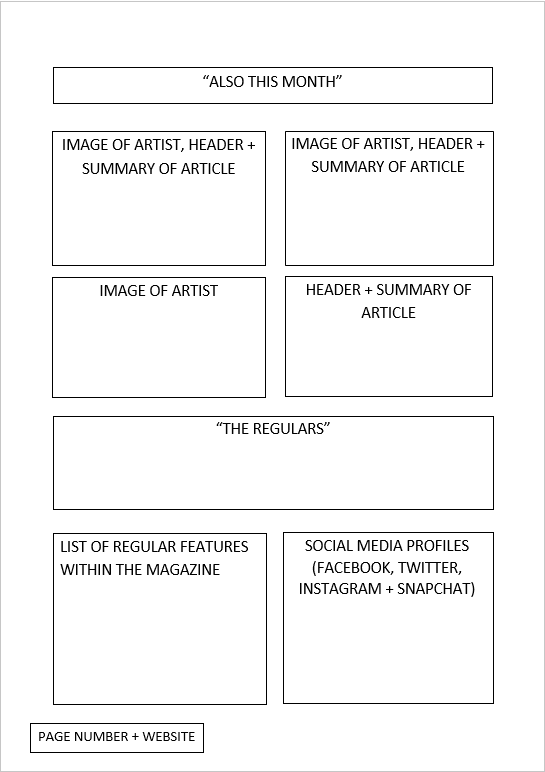
For the next step, I added in the sub-headings for the page, titled, "Also This Month" and "The Regulars". "Also This Month" is pretty much what it says on the tin. It features artists and stories that didn't quite make the cut on the first page. "The Regulars" is a list of features that are included in most or every issue, for example the monthly and trending charts and reader letters.

Tuesday, 6 December 2016

'Flow' Magazine Contents Page 2 Step 1

I started off my page by adding a white background, the same background I have used for all previous pages. To do this, I simply clicked on the 'Gradient' tool on the sidebar which brought up a drop-down menu with two options: 'Gradient' and 'Fill Bucket'. I clicked on 'Fill Bucket', made sure the colour displayed on the top-right was white, and then clicked the transparent page, which turned white.

Sunday, 4 December 2016

'Flow' Magazine Contents Page 2 Introduction

I have decided to create a second contents page to include more information on extra features that I wasn't able to fit onto the first page, as well as indicate the regular features that are designed to be a signature Flow feature in every issue. This second page will give me extra space to include some extra photos featuring other models which helps improve the variety of the magazine, rather than using only the one model which would be bland and unoriginal.